From Karbon practice management to your firm’s operating system.
Karbon is a powerful platform, but most firms use only a fraction of its potential. We build the integration, automation, and analytics dashboards that turn Karbon from just another software into an operating system your firm runs on.
Karbon ships with a powerful platform and a growing marketplace of integrations. Where Silver Sea adds value is the layer that Karbon doesn’t ship with — the firm-specific integration, automation, and reporting that turns Karbon into the operating system your firm runs on.
Custom API Integration
We connect Karbon to the rest of your stack — SharePoint, tax software, intake forms, e-signature, payments, CRM. If a workflow involves Karbon and at least one other system, we make it run automatically.
AI Automation with MCP
We’ve built a Model Context Protocol server for Karbon. Your team operates Karbon in plain English — pull work lists, draft client updates, escalate exceptions — without code or copy-paste. We help your firm get ready before AI agents become standard.
Advanced BI Dashboards
Karbon native reports cover the basics. Partner-level questions — client profitability, staff workload, extension status, AR by tier — need more. We build the Power BI layer that answers them. Karbon stays the system of record. Power BI becomes the command center.
83% of data migration projects fail or exceed budgets due to poor planning or lack of expertise.
Most issues trace back to inaccurate transfers, system mismatches, or limited testing.
With 10 years of experience, we know where the landmines are!
Understand how your firm actually works.
We map your workflows before we touch Karbon. Your department leads sign off on the configuration before go-live, not after. No surprises, no rollbacks.
No double data entry during cutover
Migrating department by department usually means weeks of staff re-keying every change into two systems. We build a custom sync utility on the Karbon API so data flows automatically between Karbon and your legacy platform. Zero manual re-entry.
Done right the first time
We handle data prep, validation, and end-to-end testing. You get a clean go-live with minimal overlap against your legacy system.
The Karbon migration service doesn’t include your client documents.
We fill the gap — moving years of client files into SharePoint with the right folder structure, naming convention, and retention policy your firm actually needs.
Migrated to your folder structure by design
We map your firm’s folder convention — accounting vs. tax separation, year-by-year, permanent files, payroll, IRS notices — and migrate documents into the structure your team already knows how to navigate. No re-training, no re-organizing post-migration..
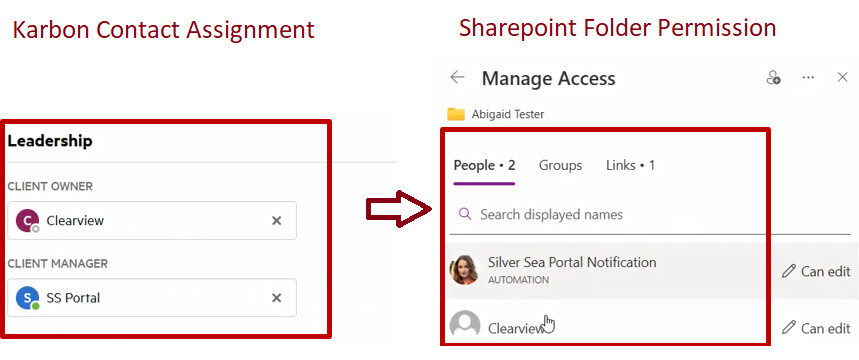
SharePoint Permission that mirrors Karbon
Folders inherit the permission model from your Karbon Client Teams. When a Client Team changes in Karbon, SharePoint permissions stay synced automatically. Security policy enforced without manual cleanup.
Retention and cleansing executed at the same time
A document migration is the cleanest moment to enforce retention. We apply your firm’s policy as files move — archiving what should be archived, purging what should be purged, flagging what needs partner review.
SharePoint can do far more than most firms get out of it. We implement it properly and connect it to your stack with RPA, API, and AI.
Staff added to contact Trigger
JL
Jane L. Access granted →
MR
Mark R. Has access
TK
Tom K. No access
🗂️
Acme Corp / TY 2025
Permissions synced from Karbon contact team
Staff removed from contact Trigger
JL
Jane L. Access revoked →
MR
Mark R. Has access
TK
Tom K. No access
🗂️
Acme Corp / TY 2025
Jane L. removed from SharePoint folder
Contact marked Inactive Trigger
JL
Jane L. Removed
MR
Mark R. Removed
TK
Tom K. Removed
🗂️
Acme Corp / TY 2025
All staff access removed — no manual cleanup needed
Automated Permission Sync
Automated permission sync from Karbon Contact to SharePoint folders allows you to open/limit access to a client’s SharePoint folder based on the assignment in Karbon, seamlessly enforcing security policy and document retention.
Automated Document Processing
We integrate SharePoint to Power Automate and AI to automatically parse any client-provided PDF files into Excel or Tax Software, and update Karbon Work Item status automatically. Saving 2-5 hours per 1040 returns.
We build the Power BI operating layer that answers the questions partners actually ask — the ones Karbon's built-in reports weren't designed for.
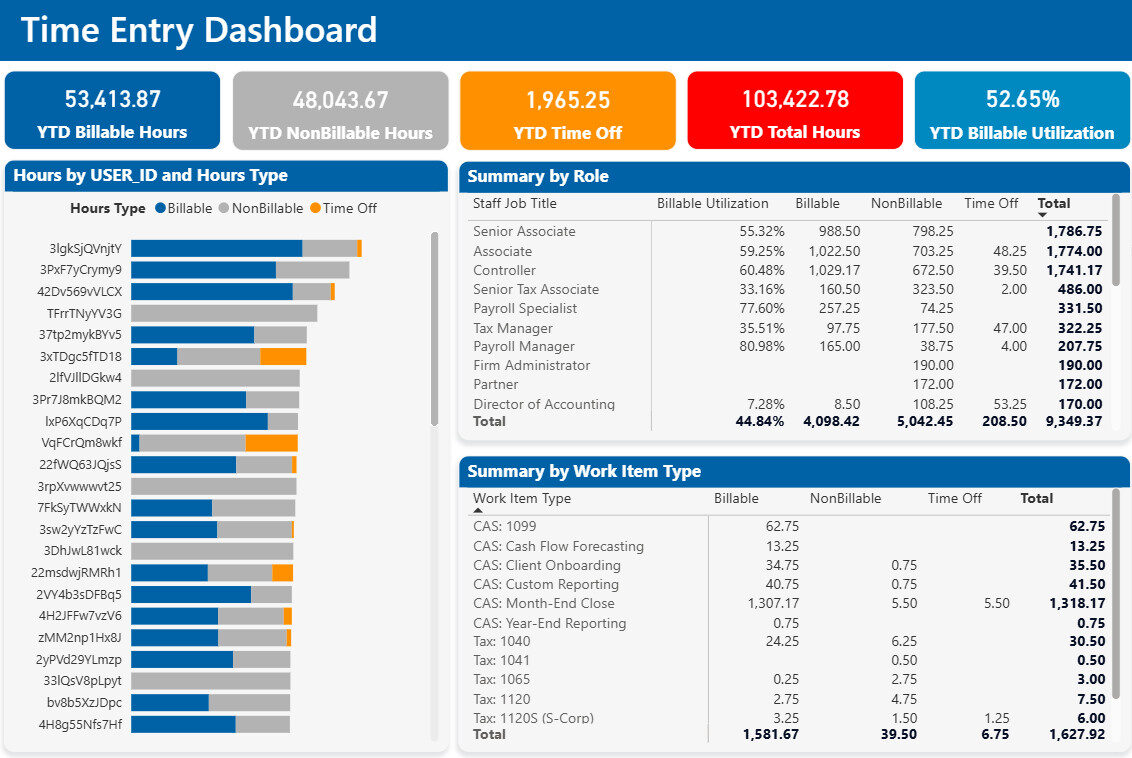
Your most valuable asset - your staff's time
Quickly see who is over/under work, who is productive, which group is producing the most revenues, etc... Ensure your members are working hard towards the common goals. And nudge those who don't!
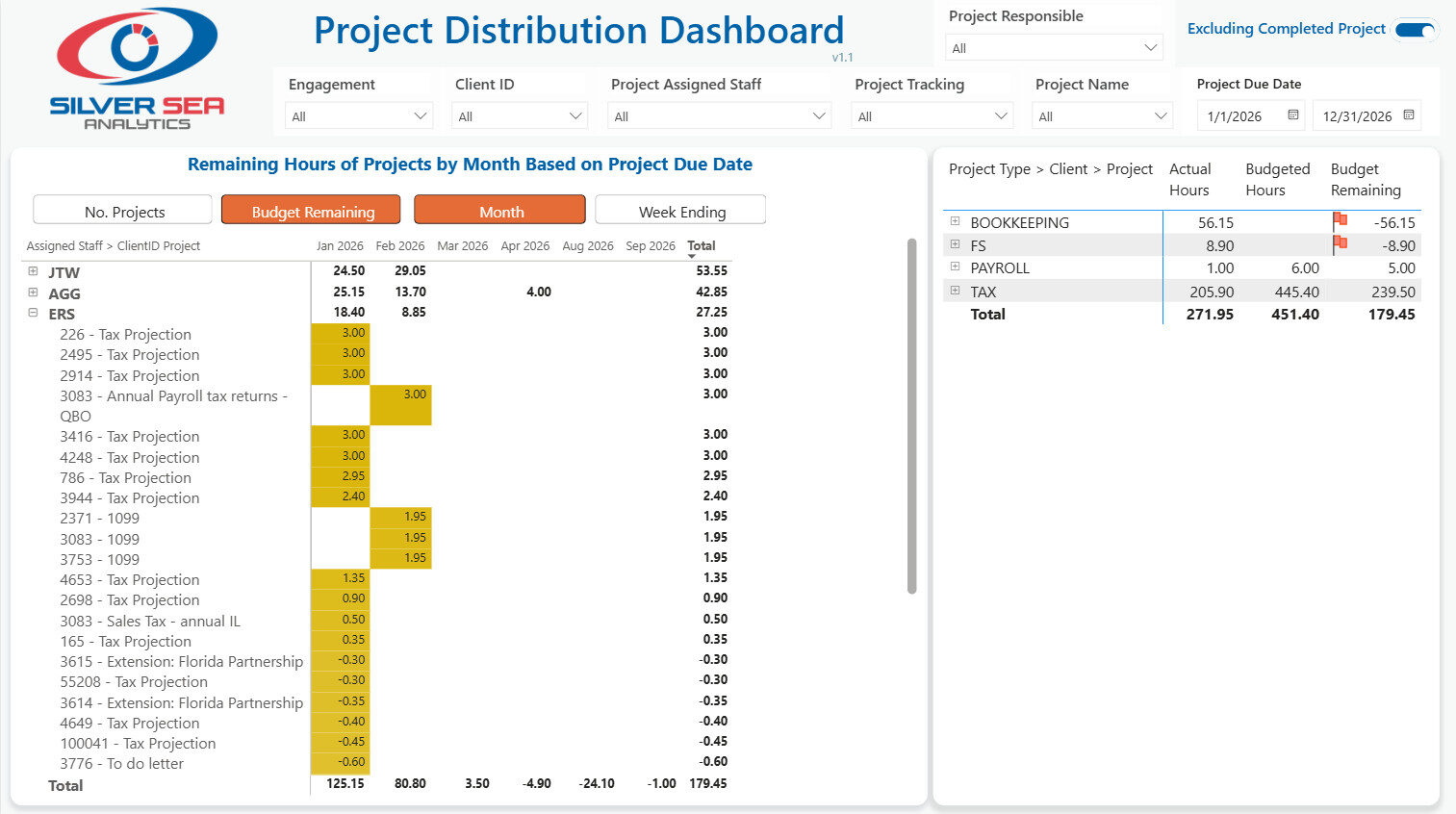
Instant Visibility into Project workloads and key deliverables
Focus on what matters - answer critical questions instantly: ✓ Workload by individual on a weekly basis? ✓ Who is working on which clients? ✓ Who has too much on his/her plates? ✓ Who can we reassign the projects to flatten the curve?
Ready to make Karbon your firm's operating system?
The firms getting the most out of Karbon aren't the ones with the most marketplace integrations turned on. They're the ones whose partners decided to build the layer Karbon doesn't ship with.
If you're considering Karbon, already running on it, or hitting the limits of what comes out of the box — let's talk through where the leverage is in your firm's setup.