Practice CS Automation & Integration for CPA Firms

Solution for CPA firms, built by A CPA

Practice CS does the job. But it doesn’t talk to the rest of your apps. Let me fix that!

Steven Tran CPA AI, Automation and Integration Solutions for CPA firms

Does any of this sound familiar?

  • Your billing staff exports invoices from Practice CS, then manually re-enters them into QuickBooks Online — for every client, every month.
  • Time entries sit unsubmitted for days. By the time you catch it, WIP is distorted and realization rates are off.
  • Client onboarding means paper forms, a phone call, and three separate data entry sessions across Practice CS, your CRM, and your client portal.
  • You run the same Practice CS reports every month — manually pulling, formatting, and emailing them to partners — when you could be reviewing them.
  • Practice CS has no built-in way to alert staff when time entries are missing, late, or below threshold.

challenges_in_manual_data_entry

We empower Practice CS with AI, Automation and Integrations

Automated Time Entry Monitoring

Time is your #1 billable asset. When staff don’t submit entries on time, you lose visibility into capacity, distort realization rates, and risk writing off legitimate work.

✅ Automatically reviews time entry reports from Practice CS on a schedule
✅ Flags exceptions — entries below threshold, missing days, or late submissions
✅ Sends targeted reminders to the individual staff member
✅ Escalates to HR or management when patterns persist
✅ Saves admin time and recovers revenue that would otherwise be written off

Schedule a discovery call

Automated Client Onboarding

When a new client is signed, Practice CS needs a record. So does your CRM. So does your client portal (ShareFile, SharePoint, etc.). Right now someone is probably doing all three manually.

✅ Client submits a guided intake form — fields enforced, no incomplete submissions
✅ Practice CS record created automatically
✅ CRM record created or updated in real time
✅ Client portal folder provisioned with correct permissions
✅ Under 2 minutes per new client vs. 30–45 minutes manually

Schedule a discovery call

Client & Invoice Sync to QuickBooks Online

Practice CS tracks time and generates invoices. QuickBooks Online handles AR and sends them to clients. Most firms re-key every invoice by hand. We eliminate that entirely.

✅ Client records synced from Practice CS to QBO automatically

✅ Invoice line items, descriptions, and amounts pushed directly — no manual entry

✅ Hundreds of accounting department hours recovered per year

Schedule a discovery call

Demo RPA creates Workstream Projects from Excel

Creating projects in CCH Axcess™ Workstream can be tedious, complex, and error-prone, given the amount of manual data entry involved. That’s why Silver Sea created an RPA solution that would save the time when you need to migrate from another system to CCH Axcess Workstream or automate the project creation process as part of client onboard or renewal. This powerful tool minimizes errors, ensures accuracy, and eliminates tedious manual setups. Experience unparalleled efficiency with our innovative solution!

Import Tax data from Excel into CCH Tax software

Data entry into tax software is essential part of tax preparation process but it is so time-consuming! Our automation technology helps save this time by feeding the data directly into CCH Axcess Tax through the API. Check out our demo video to learn more.

Technology: Python, Excel, CCH Axcess Tax

Value: save time on data entry and manual validation, reduce human error, free up tax prefessionals during busy season

Update CCH Axcess™ clients via Excel

As the usage of CCH Axcess™ grow and firms go through mergers and acquisitions, many firms struggle to maintain the data clean and consistent. System configuration is no longer optimal or consistent. Running reports also becomes inefficient and inaccurate. We can help you review your data and use automation technology to clean it for accurate reports. Using Excel is an effective way to bridge the review and mass-update processes. The best part is that it works without any API package!

Automatically executes CCH Axcess™ reports to Excel

Are you tired of reconfiguring and waiting for Axcess reports to run for your monthly/quarterly closing process, staff evaluation or operational reports? Our automation solution streamlines the report generation process and data manipulation, saving time and relieving stress.

Turn data into insights. Manage with confidence!

Critical questions are answered instantly:

✅ Which clients are most profitable this quarter?

✅ What’s our realization rate by partner, by service line?

✅ Which invoices are 30+ days outstanding?

✅ Are we on track for our monthly billing target?

Practice CS data quickly turns into insights

✅ No more waiting for reports to run

✅ Drill from firm total → department → staff → individual transaction

✅ Pre-built templates deployable in days, not months

✅ Works with your existing Practice CS data — no new software required

Are you ready to modernize your exprience with Practice CS?

One discovery call. We’ll audit your current Practice CS setup,
identify the three highest-ROI automation opportunities for your firm,
and give you a clear plan — no obligation!

Schedule a demo

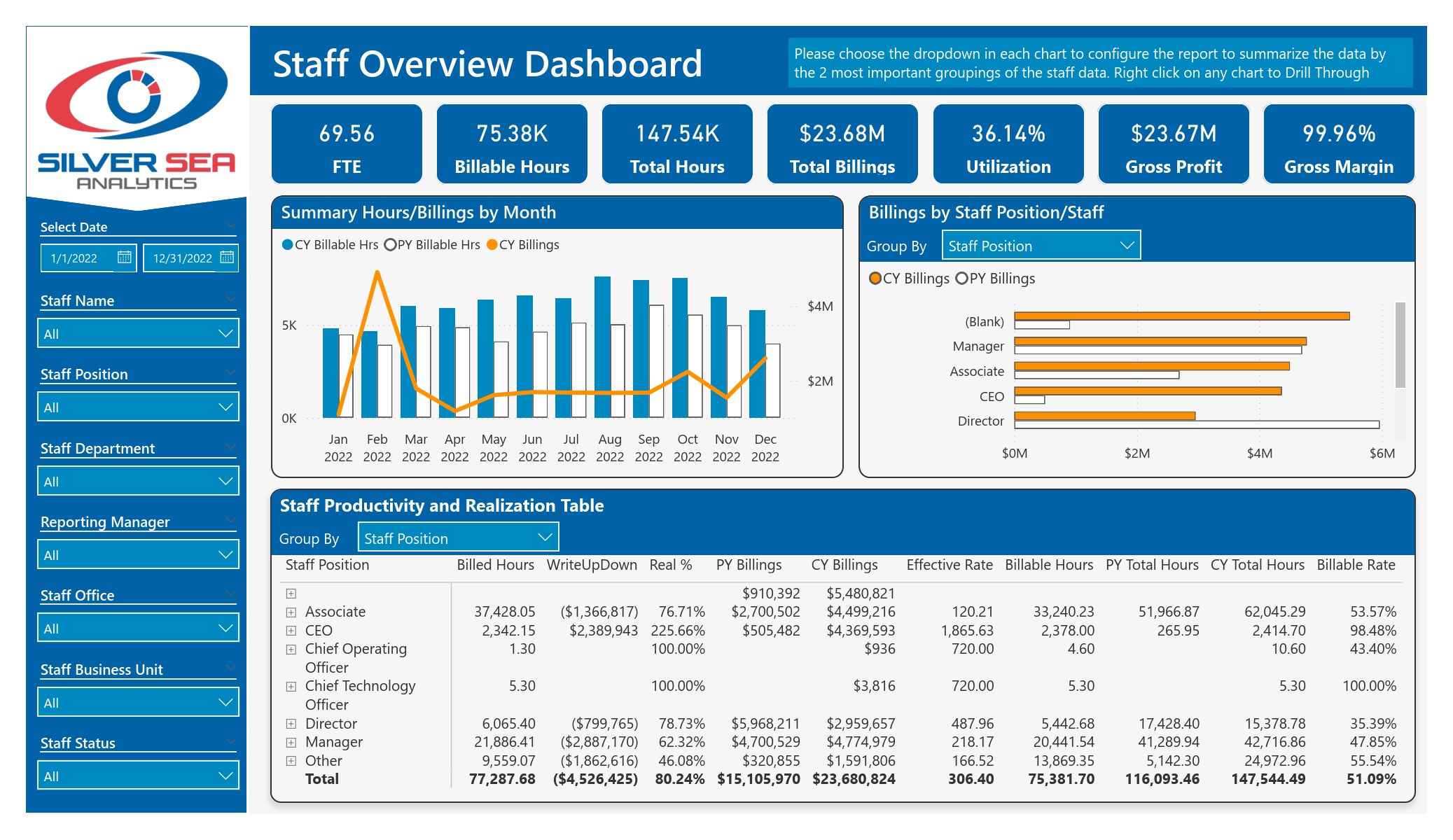
Insightful and Interactive Firm Overview Dashboard

Are you tired of static reports that take too long to run? Do you not get the information you actually need, or is the format not usable? Our Power BI reports provide clear and actionable answers to many critical questions and KPIs. You can target specific groups or components with relevant data and easily drill down from a high-level overview to detailed transaction information. Get the insights you need within minutes to make informed decisions.

The New Culture of Collaboration

Static Excel reports, and endless email exchanges full of screenshots are things of the past. It’s time to adopt a new way of collaboration. This video shows how we analyze time entry data. The report generated from any other system is usually limited and boring. However, with Power BI, you can view insightful charts and graphs, interact with the dashboard, and drill down to the detailed transactions. You can also add comments and tag coworkers, who can reply and resolve the issues. This dashboard report can highlight and alert you when things are below or above certain KPIs. Consequently, it can effectively help you monitor your team’s productivity.

CCH DAU Monitoring Solution

CCH DAU can be a valuable resource, but often, you may find your data missing. Your dashboards or automation can be unreliable, and your team might be frustrated. Our new DAU Monitoring Solution offers:

A dashboard to track the status of DAU refreshes that is easy for any user to understand.

Instant error detection alerts the administrator of any refresh issue, including the log.

Automated resolution to fix any issues that prevent tables from refreshing.

Automated integrity check to automatically validate DAU data against relevant CCH Axcess Practice reports.

Eliminate the time-consuming manual research and server logins. Our automated solution eliminates the risk of undetected errors and ensures data integrity