
On May 19, KPMG embedded Claude inside Digital Gateway — the platform where its global tax practice does client work. PwC announced its expanded alliance with Claude a week earlier. Deloitte has had an arrangement with Anthropic for months. KPMG’s Global Chairman Bill Thomas described the goal as “prioritizing security, trust, and governance as KPMG firms scale these capabilities to our clients and people around the world.”
Building a platform like Digital Gateway takes years and resources that small and midsize firms don’t have. But the same architectural property — controlled, governed AI access to client data — can be built on top of the API infrastructures that practice platforms like CCH Axcess and Karbon already publish. The protocol that makes it possible is MCP, and it is increasingly the most practical path to governed AI for CPA firms that lack Big 4 budgets.
What MCP is
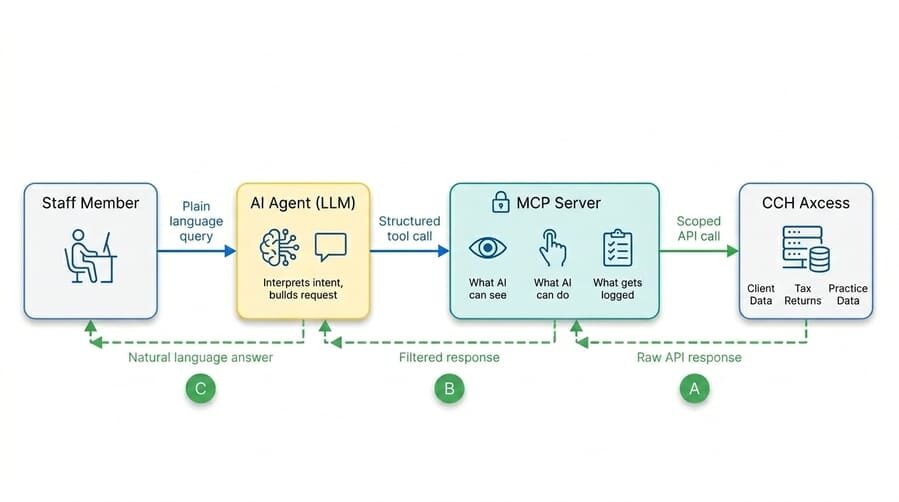
MCP — Model Context Protocol — is an open standard released by Anthropic in November 2024 that lets a Gen AI tool like Claude query and act within a specific application using natural language. An MCP server sits between Generative AI, such as Claude, and a system like CCH Axcess. It defines what the AI is allowed to see, what it can do, and what gets logged on every request.
Most firms keep their AI tools well away from sensitive client data — for a good reason. After all, once data reaches a Gen AI tool, the firm has very limited control over what happens to it. So how does a firm get value from Gen AI without handing it the keys to client data? MCP is one answer. A firm can build the guardrails into the MCP connector itself — defining what data the AI can see, what it can do, and how every request is logged. Once you build the connector, staff can query the firm’s systems in natural language — and every request follows the firm’s governance rules.
Furthermore, most modern practice platforms have offered API infrastructure for years — however, only firms with dedicated developer resources have been able to use it. Working with these APIs requires programming skills that small and midsize firms don’t have on staff. MCP removes that barrier.
What MCP looks like in CCH Axcess
Take CCH Axcess, for example. CCH Axcess has API infrastructure, but it does not ship with an MCP server. While CCH offers the CCH Practice Intelligence AI platform for purchase and private use within CCH, there is no MCP on the public roadmap. Fortunately, firms can actually build their own MCP servers, which changes the equation.
We built this simple MCP server as an example. An authorized user (including an admin staff member) can ask Claude, “Give me the details of client 88888,” or “Give me the tax return summary for client 88888.” Claude calls the connector, which queries CCH Axcess using scoped credentials, and the answer comes back in seconds. A short demo of the actual queries is here:
To see what MCP actually saves a firm, picture what that one query would require without it. A staff member who wants to grab the details of client 88888 through the API would need to have working knowledge of the API and use programming code to manipulate a series of steps:
- Read the text and figure out that the user is asking for client details
- Extract 88888 as the client ID
- Call the CCH Axcess authentication API to get an access token
- Use that token to call the find client API to locate client 88888
- Use the token again to call the get tax return API for that client
- Receive the response in JSON or XML, neither of which is human-friendly. It has a complex structure that is difficult to read and understand
- Decide which fields out of that response are worth showing — taxpayer name, filing status, AGI, refund, return status, and so on
- Transform those fields into a clean, readable answer for the user
Every one of those steps requires engineering work to design, build, and test. And every new question is its own sequence. “Give me the tax return summary for client 88888” needs a different API, a different JSON or XML structure, and different fields to show. “Give me last year’s e-file status” needs an additional one. Each new intent is yet another build. We’re not even diving into the API’s infrastructure, permission control, logging, error handling, etc.
With MCP, the same query flows differently. The staff member simply asks Claude. Claude knows what the firm’s MCP server can do and figures out which call to make. The server returns the answer.
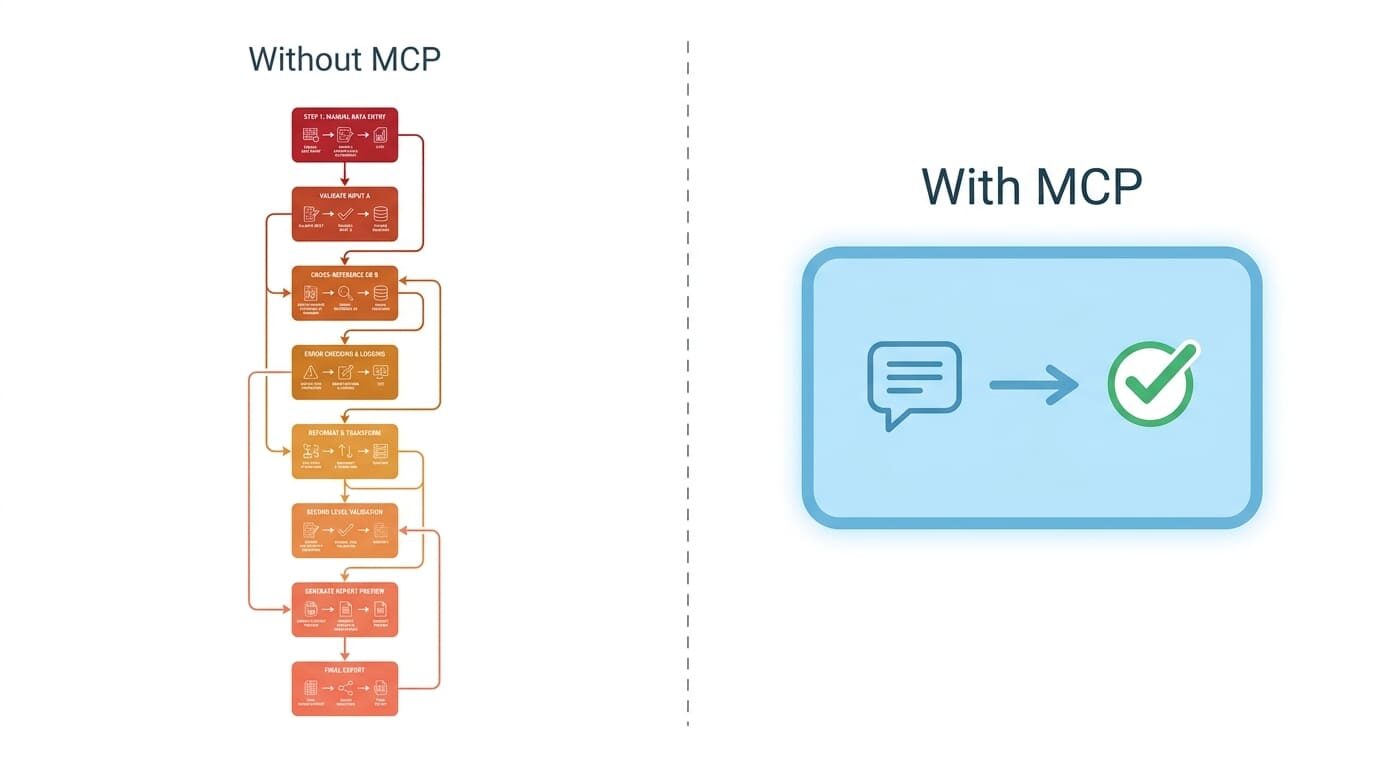
The traditional work doesn’t disappear; it lives inside the MCP server. A specialist builds it once, and the system reuses it on every query. New questions don’t need new builds. The firm describes what the connector can do; Claude works out how to use it.
What changes in practice is that when a client calls or emails inquiring about their tax returns, firms no longer need to pull preparers off doing tax returns mid-work, or give another pile of tasks to address on top of the already long days. An admin coordinator can answer it in plain language. The preparer keeps focusing on the return, uninterrupted. The system logs every access, so senior staff can review what matters rather than receive a copy of every routine question. You can review these questions and answers to build a helpful FAQ for staff training and client references.
The same approach works with any platform that offers an API — Karbon HQ, Financial Cents, QuickBooks Online, Salesforce, HubSpot, and others. CCH Axcess is the example here because it’s where most tax workflow lives. The architecture is the same wherever your firm’s data is.
The limitation that becomes the control
It’s important to point out that MCP cannot do anything that the underlying API cannot do. If CCH Axcess does not expose a field, no MCP server will surface it. MCP doesn’t do magic. It only makes working with the API easier. That limitation is also the source of MCP’s value. The MCP connector is the only path the AI has into the source system, and the firm can decide what is and isn’t possible for AI to do. That gives the firm concrete control of three things.
What the AI is allowed to see. The connector can return a tax return summary with SSNs and part of the names automatically masked, refuse to return ultra-sensitive information, filter every response to a specific client population, or hide entire endpoints from specific roles.
What the AI is allowed to do. The connector can expose read-only access and no write access — meaning the AI cannot modify a return, no matter how it is asked to. You can define specific actions by permission level: a tax admin can read a return summary; only a preparer can trigger a specific report or perform automated data import.
What’s in the audit trails? The connector logs every query, including the user identity, timestamp, request, and the exact data it returns. The log lives on a firm-controlled infrastructure and can be reviewed automatically by another bot or manually by users. If a question arises six months later about who accessed what, the firm has a record of it.
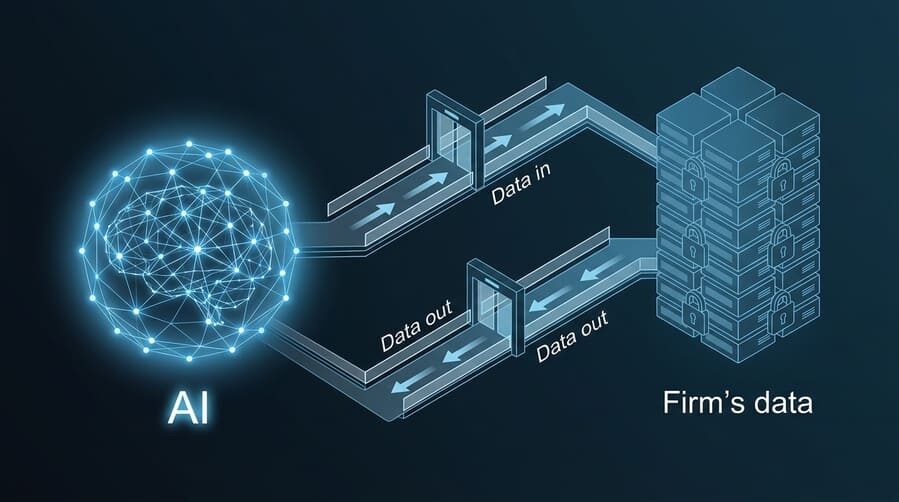
The firm doesn’t have to trust the AI with everything. It has to trust the AI with what the connector lets through — and the firm decides what the connector lets through.
Most CPA firms already have staff using Claude and ChatGPT in some capacity. If you’re thinking about what governed Gen AI access could look like (whether through MCP or another API integration approach), I’d be happy to talk it through.
Steven Duc Tran, CPA, CIA
Silver Sea Analytics — API integrations and AI infrastructure for CPA firms